Send images and documents
A lot of what a research station records isn’t text. There are photos from camera traps, scanned forms, and reports saved as PDFs. Most language models can read these too, if you send the file along with your question, and that’s one of the most useful things they can do. It’s also one of the easiest to trust too much: a model looks at a grainy photo taken at night and answers in exactly the same tone it uses when it’s right.
On this page, you’ll learn how to add an image or a document to a message. We’ll start with a photo from a camera trap, and look at the parts a message can be made of. Then we’ll send a PDF. Next, we’ll give the same photo to six models and compare what they see. We’ll finish with which providers take which files, and what a file costs.
To run the examples, you’ll need LM15 installed and an API key (see Make your first request), and the two files the examples read. Download the photo and the PDF, and save them next to your program.
A photo from a camera trap
Section titled “A photo from a camera trap”The examples in these guides follow one small program: an assistant for a wildlife research station. Something is eating the acorns under the station’s oak trees at night, and cameras like this one are how a station finds out what:
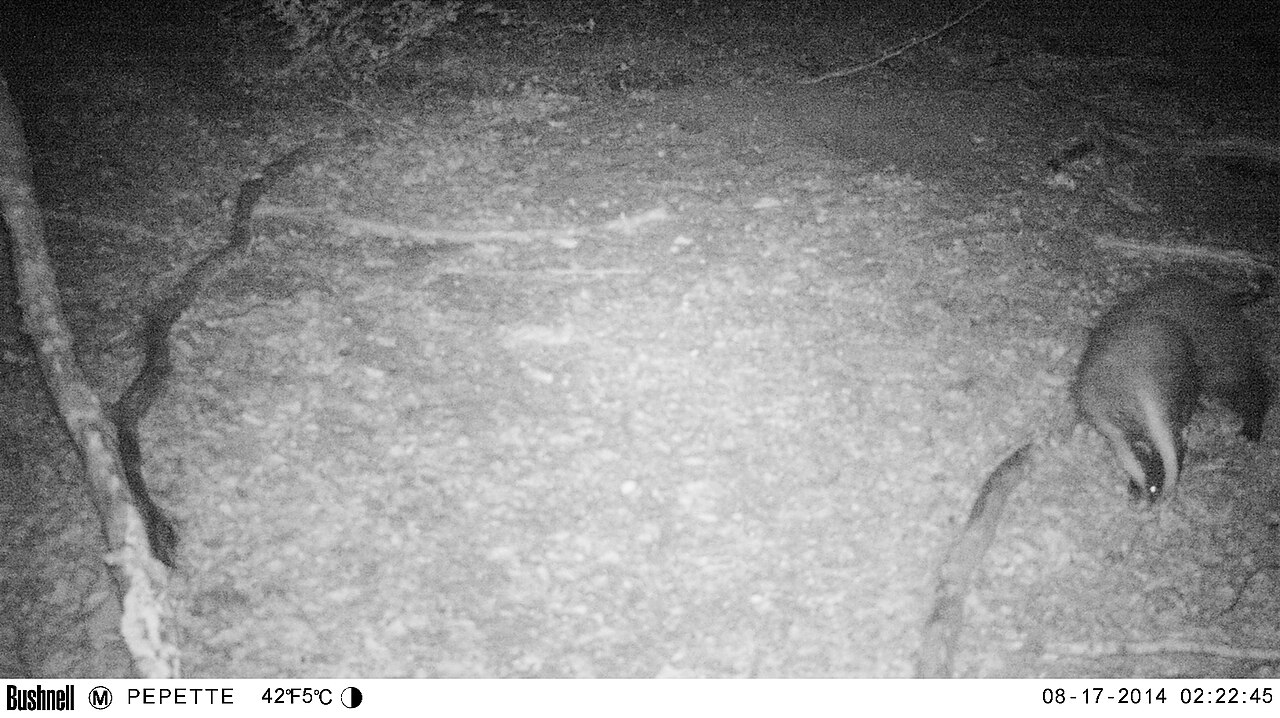
“Blaireau au début de la nuit” by peupleloup, Wikimedia Commons, CC BY-SA 2.0.
.jpg)
Here’s how to ask the assistant about it:
photo = image(path="badger.jpg", media_type="image/jpeg")
request = Request(
    model="provider:model",
    system=(
        "You are the field assistant for a wildlife research "
        "station. Answer in two sentences."
    ),
    messages=[Message.user([
        "What animal is this, and what is it doing?",
        photo,
    ])],
)
router = LMRouter()
response = router.complete(request)
print(response.text)
print(response.usage.input_tokens, "tokens in")This appears to be an American badger, identifiable by its stocky body and pale stripe down the face. It is moving with its nose to the ground, likely sniffing or foraging for prey. 1142 tokens in
The answer names the animal and says what it’s doing, and both are right: it’s a badger, and its nose is down in the leaf litter. One detail is wrong, though. The model called it an American badger, and this photo was taken in France, where the badger is the European one. Nothing in the picture says which continent it’s on, so the model filled in a detail it couldn’t see. Keep that in mind: a model describing an image will add what seems likely, and it won’t tell you which parts it saw and which it guessed.
Look at the input tokens too: 1,142. The question on its own is a few dozen tokens; the rest is the photo. Providers turn an image into tokens so the model can read it, and you pay for those tokens like any others.
A message made of parts
Section titled “A message made of parts”Until now every message has been a single piece of text. A message is really a list of parts, and text is only one kind. This one has two: the question, and the image. They reach the model in the order you list them, so a question followed by a photo reads as “here’s my question, and here’s what it’s about.”
The image part says two things: where the file is, and what kind of file it is
(its media type, here {M.photo.mediaType}). A path is the simplest source:
LM15 reads the file when it sends the request, and sends its bytes along. You
can also give it bytes you already have in memory, a web address the provider
fetches itself (not every provider can), or the id of a file you uploaded
earlier.
A document
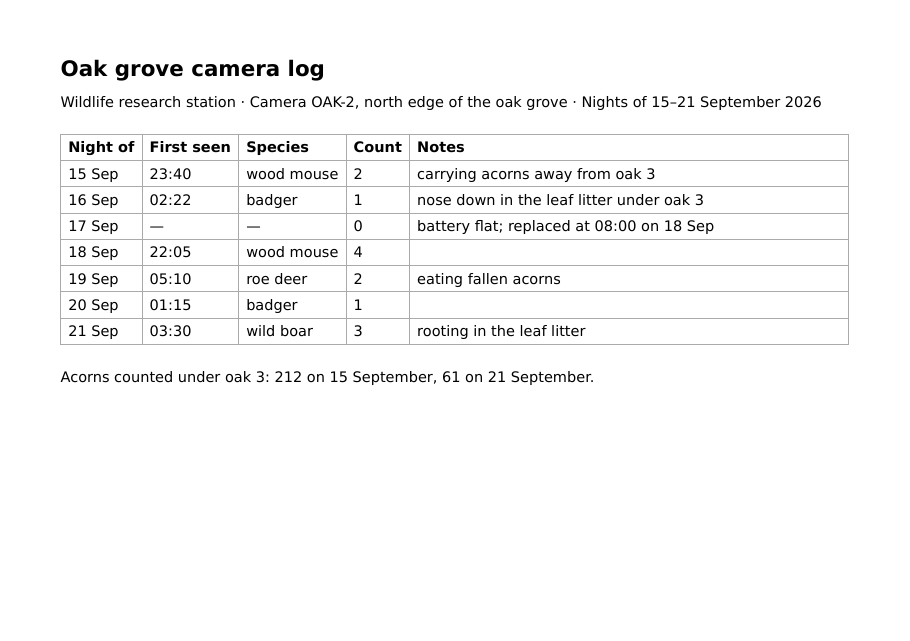
Section titled “A document”A PDF is sent the same way, as a document part. Here is the station’s camera log for one week:
logbook = document(
    path="oak-grove-log.pdf", media_type="application/pdf",
)
request = Request(
    model="provider:model",
    system=(
        "You are the field assistant for a wildlife research "
        "station. Answer in two sentences."
    ),
    messages=[Message.user([
        (
            "Which animals did this camera record, and on how many "
            "nights did it see each one?"
        ),
        logbook,
    ])],
)
router = LMRouter()
response = router.complete(request)
print(response.text)
print(response.usage.input_tokens, "tokens in")The camera recorded wood mice on 2 nights and badgers on 2 nights. It recorded roe deer on 1 night and wild boar on 1 night. 1031 tokens in
That’s correct: wood mice and badgers came on two nights each, roe deer and wild boar on one. The model read a table out of a PDF and answered a question the table doesn’t answer directly, because it had to count.
The same photo, six models
Section titled “The same photo, six models”The model is the part of this that varies most. We sent the same photo and the same question to six models. Here is the first sentence of each answer, and what the photo cost in each case:
| Provider | Model | What it said | Input tokens |
|---|---|---|---|
| OpenAI Codex | gpt-5.6-sol | This appears to be an American badger, identifiable by its stocky body and pale stripe down the face. | 1,142 |
| OpenAI | gpt-5-mini | This is a badger (the distinctive black-and-white facial stripes show a banded badger). | 1,142 |
| Anthropic | claude-haiku-4-5 | This is a porcupine, as indicated by its distinctive quilled body visible on both sides of the frame. | 1,233 |
| Google Gemini | gemini-2.5-flash | This appears to be a badger, identifiable by its stout body and prominent facial stripes. | 286 |
| DeepSeek | deepseek-chat | Based on the low-light trail camera image, this appears to be a striped skunk (or possibly a badger) captured at night while it is actively foraging or traveling across the ground. | 610 |
| OpenRouter | openai/gpt-4o-mini | This appears to be a badger, likely foraging on the ground. | 36,873 |
Some models saw a badger, and some didn’t. One saw a porcupine, and another hedged between a skunk and a badger. Every wrong answer is written just as confidently as the right ones. The documents fared better, but not perfectly: Anthropic’s model counted the nights correctly and then said the camera recorded “five animal species” before listing four. So treat what a model says about a file as a first reading, not a record. When a decision depends on it, keep the file with the answer, so a person can check.
The costs differ even more than the answers: the same photo cost 286 input tokens with one model and 36,873 with another. Providers turn images into tokens in their own ways, and some charge far more than others. Before you send a season’s worth of camera-trap photos, send one, and look at the input tokens.
Which providers take which files
Section titled “Which providers take which files”Every provider in the table above took the photo. PDFs are another matter. OpenAI’s Responses API, Anthropic and Gemini take them; the Chat Completions API that DeepSeek, OpenRouter, Groq, Z.AI and local servers use has no place for a document in a message. LM15 knows this, and refuses before sending anything, so it costs nothing:
UnsupportedFeatureError: deepseek: a document part in a user message has no slot on the Chat Completions wire (text and image_url only); the OpenAI Responses, Anthropic and Gemini dialects carry it (MAP-10)When a provider can’t take a PDF, you can turn it into something it can take: extract its text yourself and send that, or render its pages as images. Either way, you choose what the model receives.
Try it yourself
Section titled “Try it yourself”Predict what will happen before you run each one.
- Send the photo with the question “When was this photo taken?”
- Send the PDF to DeepSeek. What comes back, and what does it cost?
- Ask how many animals the camera saw in total that week. What’s the right answer?
What to expect
- The photo shows its own date and time in its bottom corner: 17 August 2014, at 02:22:45. Models read printed text in images well, so this is the kind of detail they usually get right, unlike the continent.
- The error above, before anything is sent, so it costs nothing.
- Thirteen: 2 + 1 + 4 + 2 + 1 + 3, with nothing on the night the battery was flat. Check the model’s answer against the table: counting across a table is where models slip.
A photo you send stays in the conversation, and a conversation is sent again with every new question, so the photo is too, and so are its tokens. Keep a conversation shows how a conversation grows, and what that costs.